macOS Integrations
Lumen Flow is reachable from the rest of the Mac: Spotlight, Shortcuts, Siri and Voice Control, a Menu Bar extra, Quick Look previews, and Space and Flow widgets.
A native app should be reachable from wherever you already are — the search field you just opened, the menu bar, a Finder window. Lumen Flow is a native macOS environment for designing, running, debugging, and versioning API workflows, and it plugs into the system surfaces you already use rather than asking you to come to it first.
Spotlight
Your Spaces and Flows are indexed for system search. Press ⌘Space, type the name of a Flow, and open it directly — no need to bring the app forward and navigate a sidebar to find it.
Shortcuts, Siri, and Voice Control
Lumen Flow ships App Intents, which means the same actions are available through Shortcuts, Siri, and Voice Control:
- open a Space or a Flow;
- create a Flow;
- import a collection;
- check the status of a Flow;
- run a Flow.
Running a Flow is the one that reaches the network, so it asks for confirmation before it goes ahead. An intent will not fire requests at your endpoints because a phrase was misheard or a shortcut was triggered by accident.
These are on-demand actions. Lumen Flow does not run Flows in the background on its own and does not schedule them for you — something has to ask.
Menu Bar
The menu bar extra keeps the everyday actions one click away: recent runs, running a Flow directly, and switching the active Profile — so moving from staging to production does not mean interrupting whatever window you are in.
Quick Look
Select an exported Flow or Space file in Finder and press space. Quick Look renders a preview of what is inside it — before importing, and without opening the app.
Widgets
Space and Flow widgets sit on the desktop or in Notification Center showing the current state of your work. Clicking one opens that Space or Flow in the app. Widgets are a way in, not a trigger: they do not perform requests themselves.
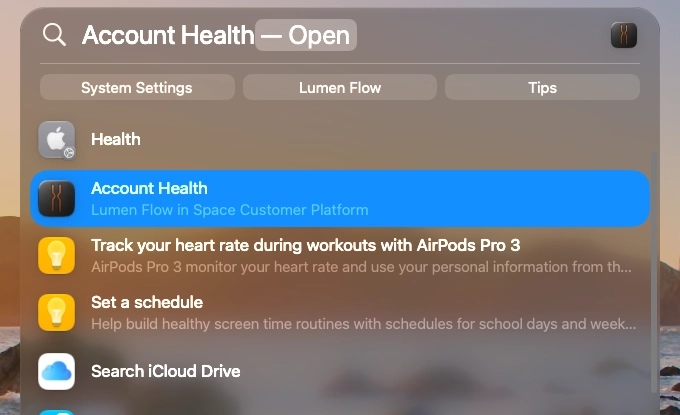
Spotlight · A Spotlight search showing Spaces and Flows among the system results.
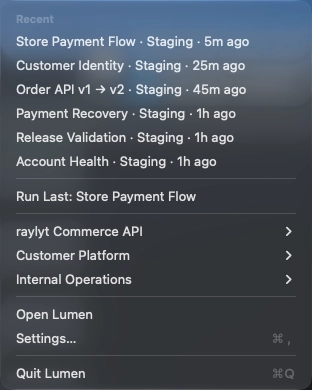
Menu Bar · The menu bar extra open on recent runs and the active Profile.
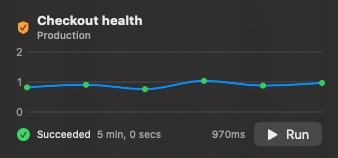
Space and Flow widget · A compact widget showing a Space or Flow on the Mac desktop.

Ready to elevate your API workflow?
Sign up for early access and get notified as soon as it's available for macOS.
Join the waitlistmacOS 26 or higher · Native Apple Silicon